
Download SpyMe – Remote Mac Control Utility
Overview
SpyMe is a lightweight utility designed specifically for macOS users who need precise, remote control over their computer’s mouse and keyboard. First released in the early 2000s, the trial version (current 1.6.5, updated 8 October 2006) still holds relevance for anyone looking for a simple, secure way to monitor or manage a Mac from another device. Unlike heavyweight remote‑desktop suites, SpyMe occupies a minimal footprint on disk, making it an ideal choice for older Macs or systems with limited storage.
The software is available in English and falls under the “Utilities” category with a subcategory of “Mouse & Keyboard,” emphasizing its focus on input‑device manipulation rather than full‑screen screen sharing. Since its addition to the catalog in 2006, SpyMe has amassed over a thousand downloads, reflecting a steady interest among power users, educators, and IT administrators who value a discreet, no‑frills solution. While the program is a trial, it offers enough functionality to test its capabilities before committing to a full license.
Its straightforward interface, combined with the ability to log mouse movements and keystrokes, makes SpyMe a practical tool for troubleshooting, parental oversight, or remote assistance without the overhead of complex networking configurations.
Key Features
- Real‑time remote mouse movement and click replication.
- Keyboard input forwarding with support for modifier keys.
- Low memory usage – the installer is under 5 MB.
- Simple activation via a menu‑bar icon for quick access.
- Secure trial mode that limits usage to 30 minutes per session.
- Compatibility with macOS 10.4 (Tiger) through macOS 10.8 (Mountain Lion).
- English language interface with clear tooltips.
- Logging feature that records mouse coordinates for later review.
- Ability to lock the remote cursor to a specific screen region.
- Automatic updates check – the app notifies you when a newer version is available.
Installation, Usage & Compatibility
Step‑by‑Step Installation
1. Download the installer: Click the “Download SpyMe” button on the product page. The file is a standard .dmg package sized under 5 MB, ensuring a fast download even on slower connections.
2.
Mount the DMG: Double‑click the downloaded file; macOS will automatically open a window showing the SpyMe application icon.
3. Copy to Applications: Drag the SpyMe icon into your /Applications folder. This step registers the program with macOS and allows it to run from the Launchpad.
4.
Launch and grant permissions: Open SpyMe from the Applications folder. macOS will prompt you to allow accessibility access (required for remote mouse/keyboard control). Accept the request in System Preferences → Security & Privacy → Privacy → Accessibility.
5. Activate trial mode: Upon first launch, a dialog confirms the 30‑minute trial limit.
Click “Start” to begin using SpyMe.
How to Use SpyMe Effectively
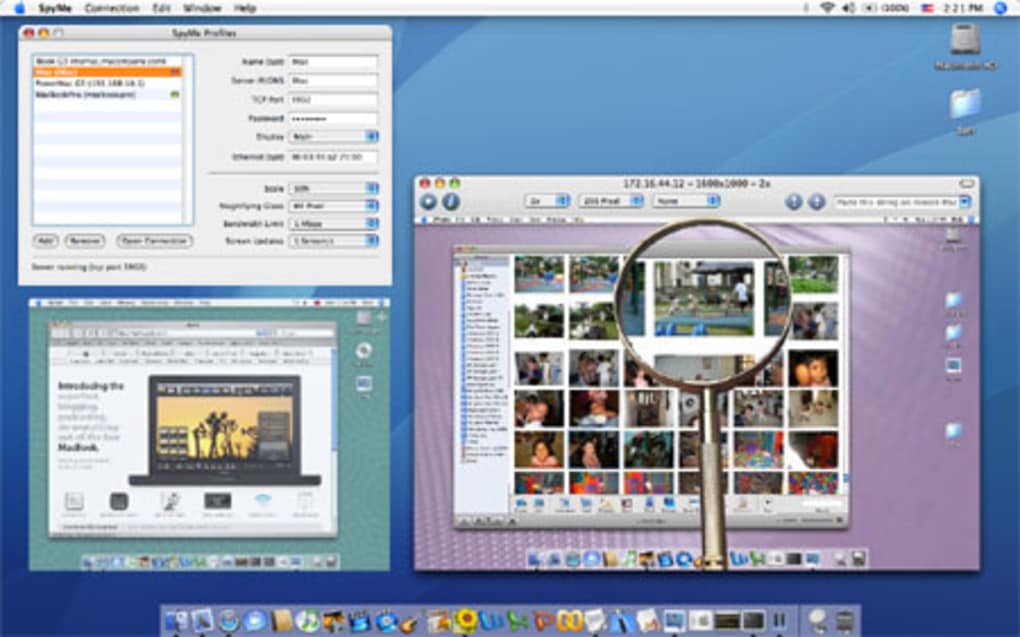
Once activated, SpyMe adds a discreet icon to the menu bar. Clicking the icon reveals a small control panel where you can:
- Enable or disable remote mouse tracking.
- Select a target Mac on the same local network (the other Mac must also run SpyMe in server mode).
- Adjust sensitivity settings for smoother cursor movement.
- Start a keyboard forwarding session, allowing you to type on the remote machine as if you were seated in front of it.
Operating System Compatibility
SpyMe officially supports macOS 10.4 (Tiger) up through macOS 10.8 (Mountain Lion). While newer macOS releases may still run the application in compatibility mode, Apple’s tightened security frameworks (notably notarization and Gatekeeper) can block unsigned binaries. Users on macOS 10.9 or later should consider running SpyMe within a virtual machine or using an older hardware Mac to guarantee full functionality. The trial version is built for Intel‑based Macs; it does not natively support Apple Silicon (M1/M2) without Rosetta 2 translation, which may impact performance slightly but generally remains usable.
Pros, Cons & Frequently Asked Questions
Pros
- Very small download size – ideal for low‑storage machines.
- Simple, intuitive interface that requires minimal configuration.
- Low‑latency remote control makes it suitable for real‑time assistance.
- Secure local‑network operation eliminates exposure to the internet.
- Free trial provides enough time to evaluate core functionality.
Cons
- Limited to older macOS versions; newer systems may need workarounds.
- Trial mode restricts sessions to 30 minutes, which may be insufficient for extended tasks.
- No built‑in screen sharing – only mouse and keyboard are relayed.
- Lacks modern authentication (e.g., two‑factor) for remote connections.
- Development appears inactive since the last update in 2006.
FAQ
Is SpyMe safe to use on a corporate network?
Yes. SpyMe only communicates over the local LAN and does not open external ports, making it safe for internal use. However, administrators should enable macOS’s built‑in firewall and restrict which devices can run the server component.
Can I use SpyMe on macOS Catalina or later?
Officially no, because the binary is not notarized for macOS 10.15+. You can still run it using Rosetta 2 on Intel Macs, but full compatibility is not guaranteed.
What happens after the 30‑minute trial expires?
The application will automatically pause remote control functions and display a prompt to purchase a full license. All logged data remains saved locally.
Does SpyMe log keystrokes?
SpyMe records mouse coordinates but does not store keystroke data for privacy reasons. Keyboard input is forwarded in real time without persistent logs.
Is there a way to automate SpyMe actions?
The trial version does not include scripting support. However, advanced users can combine SpyMe with AppleScript or Automator to trigger remote sessions, though this requires manual configuration.
Conclusion & Call to Action
SpyMe remains a niche but effective tool for macOS users who need a fast, low‑overhead method to control another Mac’s mouse and keyboard remotely. Its tiny footprint and straightforward design make it especially appealing for legacy machines or environments where full‑blown remote‑desktop solutions would be overkill. While the lack of recent updates and limited macOS support are notable drawbacks, the free trial offers a risk‑free way to evaluate whether SpyMe fits your workflow. If you’re an educator needing to guide students, an IT professional troubleshooting a workstation, or a parent looking for basic oversight, give SpyMe a try today. Click the download button below, follow the simple installation steps, and experience remote control without the complexity.
0.00






